How to register a level of Catia
Here is how to
accomplish the registry of Catia V5-6R2013 as your default program.
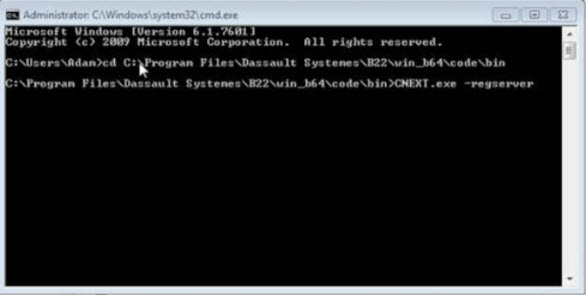
1. Open the command prompt as an admin.
2. Change the drive
to C:\Program Files\Dassault Systemes\B23\win_b64\code\bin
3. Then register the
Release 2013 by entering the command;
C:\Program
Files\Dassault Systemes\B23\win_b64\code\bin>CNEXT.exe –regserver
( By doing this your
making R23 your default program for opening a CATPart)
|
|
Related Articles
Decrease CATIA Startup Time
Decrease CATIA Startup Time Before you begin: The following environment variables can either be set for the user or the system. Going to Start > Control Panel > Systems and selecting the “Advanced” tab and clicking on Environment Variables will ...
Saving PDF from Catia
Saving as PDF from CATIA 1 Copyright © 2011, Inceptra LLC. All Rights Reserved. Title: Saving as PDF from CATIA Application: CATIA V5 Release: N/A Summary: This article describes the setting required to save a PDF file format from CATIA that will ...
Ford Moving to Catia V5R2012
Document shows Ford's move to V5-6R2012 Purpose The purpose of this letter is to provide early notification of the upcoming release of the Ford-specific C3PNG CAD and Engineering software suite. This suite consists of Dassault Systemes CATIA V5, ...
Multi-processor Use in Catia
Multi-processor Use in CATIA 1 Copyright © 2011, Inceptra LLC. All Rights Reserved. Title: Multi-processor Use in CATIA Application: CATIA V5 Release: N/A Summary: This article describes the functionality in CATIA that will take advantage of a ...
CATIA crashes when trying to connect to SMARTEAM with CATIA Web Integration.
CATIA crashes when trying to connect to SMARTEAM with CATIA Web Integration. This issue is occurring because Internet Explorer 9 is installed on the system. CATIA Web Integration is only certified with Internet Explorer 7 or 8. To remove Internet ...